FultonStudio Service
Custom Website Dashboard & CMS Editing Systems
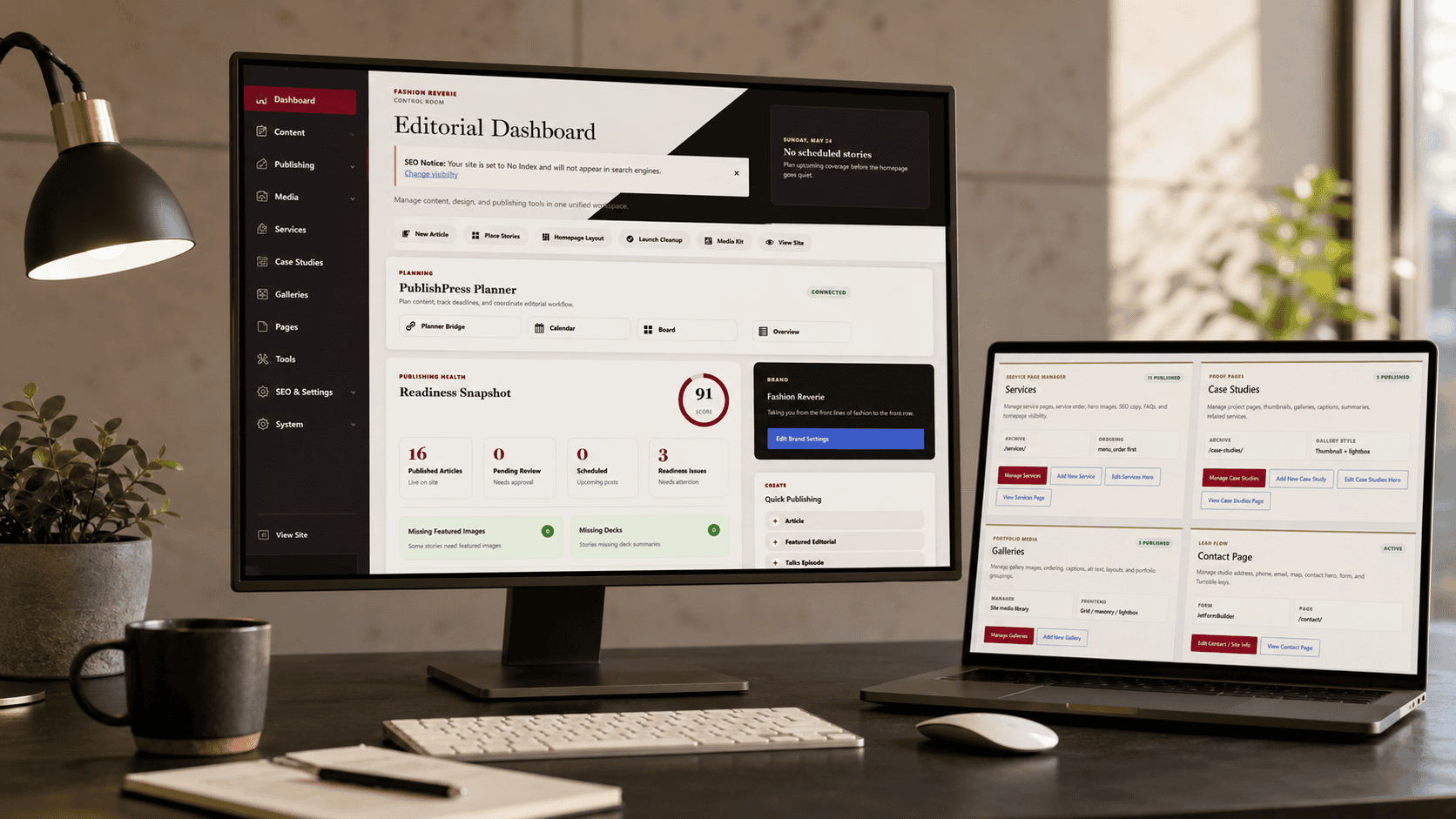
Custom website dashboards and CMS editing systems built around the way the business edits the site, so owners and teams can update important content without touching code or breaking the layout.
Why This Matters
Most websites are either too locked down or too easy to break.
A business owner does not always need a backend full of fragile layout controls. Most of the time, the useful editing areas are the parts that actually change: homepage text, service pages, galleries, case studies, pricing, calls to action, footer text, contact details, schema fields, and featured content.
A custom CMS dashboard or editing system gives the site owner useful control while protecting the design system.
What FultonStudio Looks At
The backend should match the way the site is edited.
Editing Habits
What the site owner or team really changes after launch, and what should stay protected.
Content Types
Service pages, case studies, galleries, pricing, homepage modules, and featured content.
Risk Points
Where page-builder rows, duplicated layouts, app blocks, or open editing access can create problems.
Media Workflow
How images, captions, alt text, galleries, and case-study visuals should be managed.
SEO Fields
Where footer text, schema information, page descriptions, and internal links need control.
Admin Clarity
How to make the backend feel understandable instead of buried under plugin menus.
What We Build / What We Improve
Controlled editing screens for the parts of the site that matter.
FultonStudio can build custom admin screens, CMS fields, or platform-specific editing workflows for homepage text and images, service pages, case studies, galleries and captions, pricing sections, footer SEO text, contact details, schema/business information, calls to action, and featured content.
This avoids accidental layout damage, complicated backend digging, repeated manual rebuilds, and waiting on a developer for every small text change.
What You Get
A safer editing experience after launch.
Service-page fields
Case-study tools
Drag and drop gallery management
Pricing controls
Footer SEO fields
Contact and schema fields
CTA and featured-content controls
Good Fit For
A cleaner editing system for the platform your site actually uses.
Good for businesses that need a website management system that can be updated safely, whether the site uses WordPress, Joomla, Shopify, Squarespace, Wix, Webflow, or a fully custom CMS.
Next Step
Make the site easier to manage after launch.
Start with a review of what the site needs to control, protect, publish, and update.
Request a Site & Brand ReviewFAQ
Frequently Asked Questions
What is a custom website dashboard or CMS editing system?
A custom website dashboard is a cleaner editing area built around the parts of the site that actually need to change. Instead of digging through fragile layouts, your team can update service pages, galleries, case studies, pricing, calls to action, contact details, SEO fields, and other important content from organized screens.
Is this only for WordPress websites?
No. FultonStudio can work with WordPress, Joomla, Shopify, Squarespace, Wix, custom CMS builds, and existing website systems. The goal is not to force every site into one platform. The goal is to make the site easier to manage based on how the business actually uses it.
Why would a business need a custom dashboard?
Many websites are either too locked down or too easy to break. A custom dashboard gives your team useful control while protecting the design, layout, and structure of the site. It helps prevent accidental layout changes while still making day-to-day updates easier.
What kind of content can the dashboard control?
A dashboard can manage homepage text, service pages, case studies, galleries, captions, image alt text, pricing sections, calls to action, footer copy, contact details, SEO fields, schema/business information, featured content, and publishing checklists.
Can it help with image-heavy websites or galleries?
Yes. For image-heavy sites, FultonStudio can create safer gallery tools for uploading, reordering, captioning, adding alt text, choosing featured images, and organizing portfolio, product, case study, or editorial visuals without rebuilding the page layout each time.
Can this make case studies easier to publish?
Yes. A custom editing flow can guide the case study process with fields for the industry, services provided, challenge, strategy, work completed, results, before images, after images, testimonials, SEO titles, and related links. That makes it easier to publish proof in a consistent format.
Does this replace a developer?
Not completely. It reduces the need to call a developer for every small content update, but larger design changes, new features, custom integrations, and technical fixes may still need development work. The dashboard is meant to make common updates safer and faster.
Can existing websites be improved with this, or does the site need to be rebuilt?
It depends on the current system. Some existing websites can be improved with better editing screens, cleaner fields, or a more organized backend. Other sites may need a rebuild if the structure is too fragile, outdated, or difficult to modify safely.
How does this help with SEO?
A better editing system can make SEO fields easier to manage, including page titles, meta descriptions, image alt text, internal links, schema information, footer copy, and service-page content. It does not replace SEO strategy, but it makes it easier to keep important SEO details from getting ignored.
Will my team still be able to update the site?
Yes. The point is to give your team clearer editing areas for the parts they should control, while protecting the layout and design system from accidental changes.
Can different people have different editing access?
Yes, depending on the platform. Some dashboards can be set up so different users have access to different areas, such as content updates, galleries, case studies, pricing, or publishing review.
Is this useful for small businesses?
Yes. It is especially useful for small businesses that need to update services, photos, pricing, case studies, and contact details, but do not want to risk breaking the website every time a change is made.
Is this useful for larger or content-heavy websites?
Yes. Larger sites often need more structure, not more freedom. A custom dashboard can help organize publishing workflows, image management, service updates, article or case study submissions, review steps, and required fields before content goes live.
What is the difference between a normal CMS and a custom dashboard?
A normal CMS gives you general editing tools. A custom dashboard organizes the editing experience around your specific website: the pages, content types, fields, media, SEO needs, publishing checks, and update habits that matter to the business.
How does a project like this start?
It starts with a review of the current website, the platform it uses, what needs to be updated regularly, what should stay protected, and where the current backend is causing confusion or delays. From there, FultonStudio can recommend whether the site needs dashboard improvements, a partial rebuild, or a more complete website planning process.